Skip the mAh: The Watt-Hour Check That Tells You What a Power Bank Really Delivers
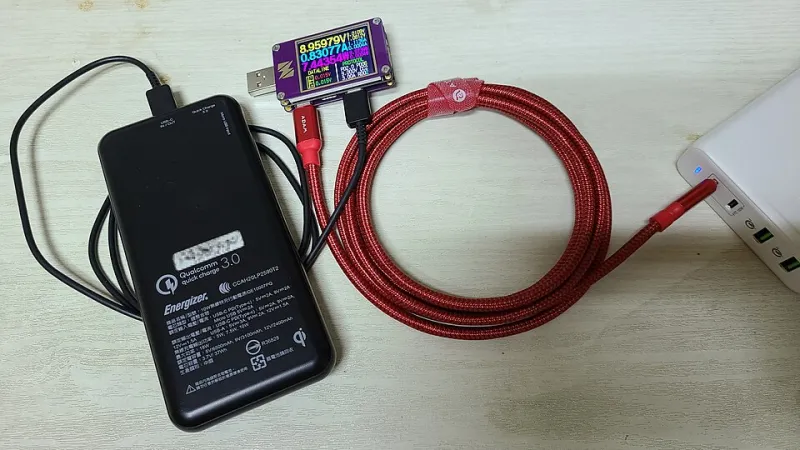
Photo: OnionBulb, CC BY-SA 4.0, via Wikimedia Commons
A 10,000mAh power bank sounds like a simple promise: about three phone charges, a weekend of backup, maybe a flight and a commute without hunting for an outlet. In practice, the number on the box is a cell rating, not a measurement at the USB-C port. Conversion loss, cable resistance, heat, and your phone's charging curve all take a bite before the energy reaches the battery.
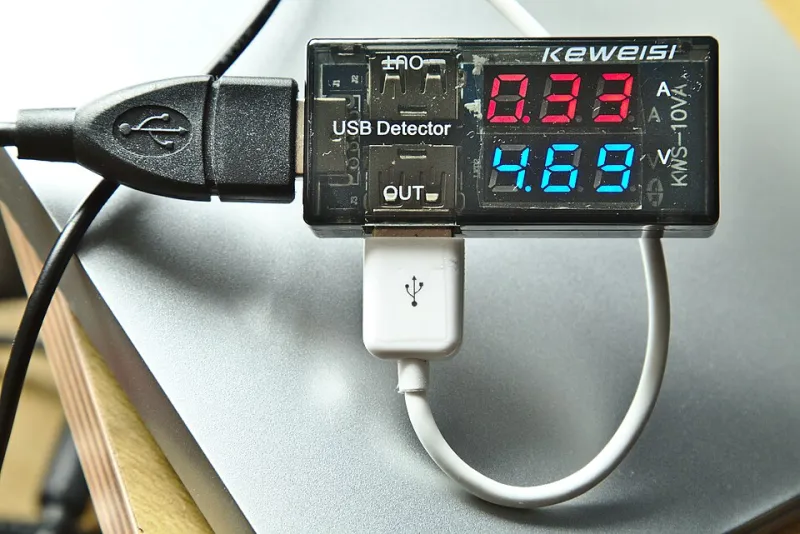
The good news: you do not need a lab to get a useful reality check. A $20 USB-C power meter and 15 minutes with your phone at about 20% will tell you more than the packaging does. Below is the test, the math, and a buying checklist for US travelers who depend on a power bank rather than admire it.
Why 10,000mAh Never Arrives as 10,000mAh
Most power bank cells are rated at 3.7 volts. To compare against your phone, convert to watt-hours: mAh × volts ÷ 1,000. A 10,000mAh bank is roughly 37Wh of stored energy. That is the raw cell figure, before the bank's circuitry boosts it to 5V, 9V, or 15V for USB-C Power Delivery.
That boost is not free. A decent bank might lose 10% to 15% in conversion. The cable adds resistance, especially if it is thin, long, or old. The phone's charging circuit adds a little more. Then there is the charging curve: phones pull hard at low battery and taper above 80%, so the last 20% is slow and inefficient.
Put it together and a 37Wh bank often delivers something closer to 27Wh to 32Wh at the port. If your phone has a 15Wh battery, that is roughly two solid charges, not three. The label is not fake. It is just measured somewhere other than the place you care about.
The 15-Minute Meter Test
You need three things: an inline USB-C power meter, the cable you actually carry, and a phone at around 20%. Charge the bank fully first and let it sit until it is not warm. Heat is wasted energy.
- Find your phone's approximate battery watt-hours. Check the spec sheet for mAh and multiply by 3.85, then divide by 1,000. A 4,000mAh phone is about 15.4Wh. If you cannot find the spec, use the number from a reputable teardown or battery-info app as a rough stand-in.
- Plug the meter between the bank and the phone. Reset the meter's watt-hour counter. Note the phone's starting percentage.
- Turn the screen off and leave the phone alone for 15 minutes. Do not stream, navigate, or use it. You want the bank's output, not your apps' appetite.
- After 15 minutes, record the meter's delivered watt-hours and the phone's ending percentage.
Now do the math. Suppose the meter shows 6.0Wh delivered and the phone moved from 20% to 50%. That is a 30-point gain. If the phone's battery is 15Wh, the energy added to the battery is about 4.5Wh (15 × 0.30). Divide 4.5 by 6.0 and you get 75% end-to-end efficiency.
To estimate usable output from the whole bank, multiply the bank's nominal watt-hours by that efficiency. A 37Wh bank at 75% gives about 27.8Wh. Divide by the phone's 15Wh battery and you get about 1.8 full charges. If the same test shows 85% efficiency, the estimate rises to about 2.1 charges. That gap is why one test beats a shelf full of vague reviews.
Reading the Result Without Fooling Yourself
A 15-minute test is a snapshot, not a certification. Charging from 20% keeps you in the phone's faster, more consistent zone, but the current still changes as the battery fills. Use the same cable, the same phone, and a similar starting percentage if you compare two banks. Do the test once at home and once with the cable in your travel bag; if the number drops sharply, the cable is suspect.
Also check the meter's own display. Some cheap meters show mAh only. Watt-hours are the useful number because they account for voltage. If your meter shows only mAh, look for a Wh screen or use a model that does. And do not test while the phone is hot or in direct sun. A warm phone throttles charging, which looks like a bad power bank when it is really a bad test.
If a new 10,000mAh bank delivers less than about 70% end-to-end efficiency in this test, that is a yellow flag. It could be a weak cable, a low-quality converter, or a bank that inflates its cell rating. Try a known-good cable before you blame the bank. If the number stays low, return it while you can.
The Buying Checklist for US Travelers
Look for watt-hours first. Airlines and the FAA care about watt-hours, not marketing mAh. A 10,000mAh bank is about 37Wh, a 20,000mAh bank is about 74Wh, and a 26,800mAh bank is around 99Wh. Lithium-ion power banks under 100Wh can generally go in carry-on bags; 101Wh to 160Wh usually needs airline approval, and they should not go in checked luggage. Check your airline's current rules before you fly.
Then check the USB-C port, not just the port count. For a phone, 20W USB-C PD is the floor; 30W or more is better for tablets and quick top-ups. Samsung phones benefit from PPS support. If you want to charge a laptop, look for 45W to 65W from a single port and read the fine print about total output when two devices are plugged in. Many banks advertise 65W but split it across ports.
Finally, factor in the boring stuff: an included cable rated for the wattage, a warranty you can actually use in the US, and a weight you will carry. A 20,000mAh bank is great for an outage and annoying in a jacket pocket. If you mostly need one phone charge on a commute, a smaller 10,000mAh bank with honest output beats a brick that stays home.
The 10,000mAh label is a starting point, not a guarantee. A cheap meter and 15 minutes will tell you what your bank really does, and a watt-hour-first checklist will help you buy the next one with fewer surprises.