The Dashboard USB Port Is a Decoy: A 15-Minute Road-Trip Charging Check
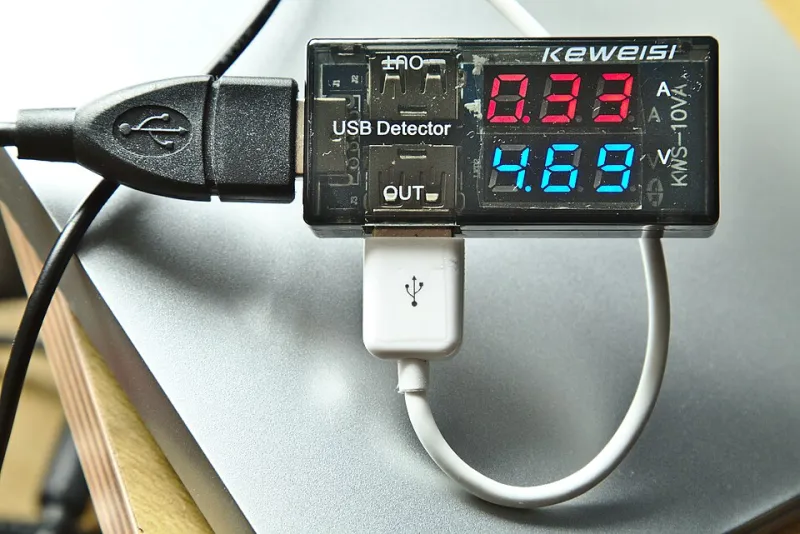
Photo: Jacek Rużyczka, CC BY-SA 4.0, via Wikimedia Commons
Road trips have a way of turning every dashboard port into a promise. You plug in, the phone buzzes, and the battery icon seems to move in the right direction. Then you add navigation, a podcast, and a screen at full brightness, and suddenly the phone is holding steady at 11 percent like it has decided to live there.
The culprit is not always the cable. Often it is the port itself. Plenty of built-in dashboard USB outlets and inexpensive 12V adapters are designed for modest charging, not for running a phone as a live map and jukebox at the same time. The label may say USB. The reality may be closer to a trickle.
A cheap USB power meter can settle the question in about 15 minutes. You do not need a mechanic, a special app, or a lab coat. You just need to test the port under the kind of load a road trip actually creates.
Why the dashboard port feels faster than it is
USB ports are not all equal. A basic charging port might supply 5 volts at 0.5 amps, which works out to 2.5 watts. A better one might deliver 5 volts at 1.5 amps, or 7.5 watts. A modern phone can pull much more from a proper USB-C Power Delivery charger, but the dashboard outlet may not support those higher-power handshakes at all.
That matters because phones are not passive passengers. With Google Maps or Waze running, the screen on, GPS active, and music streaming over Bluetooth, a phone can easily consume several watts. If the port supplies less than the phone uses, the battery drains anyway. It just drains more slowly than it would with nothing plugged in.
Cheap 12V adapters can have the same problem. A no-name adapter with two USB-A ports and a suspiciously low price may split a small power budget between outlets. Plug in two phones and both may crawl. Some adapters also advertise fast charging but only hit those numbers with one specific cable and one specific phone model. The rest of the time, they fall back to a basic 5-volt mode.
The 15-minute test
What you need
- A USB power meter that sits inline between the cable and the phone. These are often $10 to $20 online. Get one that shows voltage and current at minimum.
- The cable you actually use on road trips. Do not switch to a fancy cable for the test and then go back to the gas-station cable for the drive.
- Your phone, charged somewhere between 30 and 70 percent. Very full batteries naturally slow down, and very empty ones can behave differently.
- A passenger who can watch the meter. Do not poke at a power meter while driving.
Step by step
- Start the car and plug the meter into the dashboard port. Then connect the cable and phone. Give it 30 seconds to settle.
- With the phone idle and the screen off, note the voltage and current. This is your baseline.
- Wake the phone, open your navigation app, start a route, and play music. Turn the screen brightness up to something realistic for daytime driving.
- Watch the meter for a few minutes. Note the voltage and current while the phone is working.
- Repeat the same test with your 12V adapter, if you have one. Use the same cable and the same phone conditions.
You are looking for two things: whether the voltage sags under load, and whether the current stays high enough to matter.
Reading the numbers without overthinking them
The math is simple: volts multiplied by amps equals watts. A reading of 5 volts and 1 amp is 5 watts. A reading of 4.8 volts and 0.45 amps is about 2.2 watts. That second number is the kind of reading that explains why your phone barely gains battery while navigating.
A healthy basic port might hold around 5 volts and deliver 1 amp or more. A weaker port may drop toward 4.7 volts and less than 0.5 amps under load. Voltage sag is not automatically a disaster, but a big drop combined with low current is a clear sign the port is struggling.
Do not expect dashboard readings to match a wall charger. The question is not whether the car can charge a phone at maximum speed. The question is whether it can run the phone's road-trip workload without losing ground. If the phone stays at the same percentage after 15 minutes of navigation and music, the port is at least keeping up. If the percentage falls, you have your answer.
Also pay attention to heat. A warm adapter is normal. A hot one, a buzzing one, or one that smells like hot plastic should come out of the socket. That is not a performance issue. That is a stop-using-it issue.
When to pack a dedicated 12V charger instead
If the factory port tests weak, a reputable 12V charger with USB-C Power Delivery is usually the better road-trip tool. Look for a clearly stated wattage, a known brand, and the USB-C PD standard rather than vague claims about fast charging. A 30W or 45W adapter is plenty for most phones and gives you headroom for a passenger's device.
That said, test the adapter too. The 12V socket itself can be the bottleneck in older cars, and some vehicles cut power to that socket when the engine is off. If you leave an adapter plugged in overnight, you may be borrowing trouble from the battery. Unplug it when you park for long stretches unless you know the socket is switched off.
Cable quality still matters. A loose connector or a thin charge-only cable can waste the advantage of a good adapter. Use a cable that fits firmly and is rated for the power you expect. If the meter shows the voltage bouncing around when you wiggle the plug, replace the cable before blaming the car.
A small packing rule for 2026
Before the next holiday drive, spend 15 minutes testing the ports you plan to use. Label the good ones in your head, or literally with a piece of tape. Put the weak factory port in charge of nothing important. Let it top off a battery case or a passenger's phone at idle. Give the navigation phone the strongest port you have.
Nine watts is not a magic number, but it is a useful reminder: small charging numbers add up on a long drive. A port that delivers 2.5 watts is not useless. It is just not ready to run your phone as a road-trip command center. Test it once, pack the right adapter, and spend the drive looking at the road instead of the battery percentage.